We Use CookiesWe use cookies to enhance the security, performance, functionality and for analytical and promotional activities. By continuing to browse this site you are agreeing to our privacy policy

Top 10 Projectors Deals Right Now
#1Value for Money
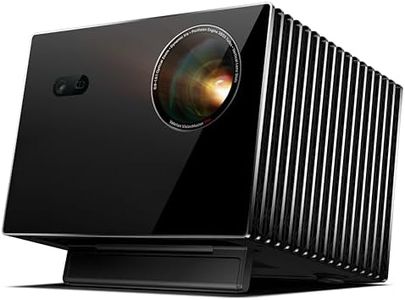
Sony BRAVI

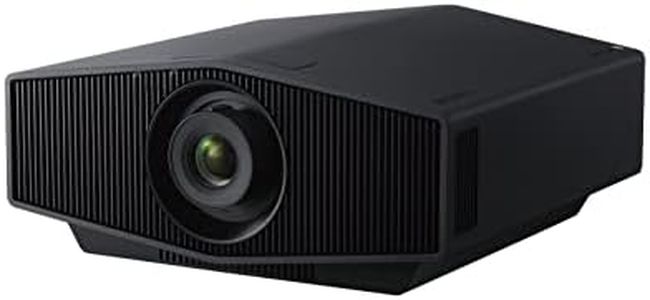
Sony BRAVIA Projector 9 - 4K HDR Laser Home Theater Projector with Native 4K SXRD Panel (VPL-XW8100ES), Black

Strong performance without the fancy price
Great quality for the money
Priced right for everyday life
How do we rank products for you?

Our technology thoroughly searches through the online shopping world, reviewing hundreds of sites. We then process and analyze this information, updating in real-time to bring you the latest top-rated products. This way, you always get the best and most current options available.

headphones-stars

Our Top Picks

#1Value for Money

Sony BRAVIA Projector 9 - 4K HDR Laser Home Theater Projector with Native 4K SXRD Panel (VPL-XW8100ES), Black

The Sony BRAVIA Projector 9 (VPL-XW8100ES) is a high-end home cinema projector designed for those who want a top-quality 4K viewing experience. It features a native 4K resolution of 3840 x 2160 pixels, ensuring sharp and detailed images. With up to 3,400 lumens of brightness, it can deliver vibrant and clear pictures even in rooms that aren’t totally dark. The laser light source not only provides consistent brightness but also offers a very long lamp life of about 20,000 hours, meaning less frequent replacements compared to traditional lamps.

Its advanced optics and Sony’s XR Processor enhance color accuracy and contrast, producing rich, natural colors with the help of technologies like TRILUMINOS PRO and Wide Dynamic Range Optics. This means you get bright highlights and deep blacks, making movies and shows look more lifelike. The projector also stores picture settings for different screen formats, which is convenient if you switch between setups.

The projector supports HDMI connectivity, which is standard for home theater equipment. It is quite large and heavy at 40 pounds, making it better suited for a fixed home theater setup rather than frequent moving. This Sony model is an excellent choice for those who prioritize outstanding image quality, long-lasting brightness, and detailed colors in a home cinema environment, though its size may limit portability and flexibility.

#2

Great Choice

Epson Pro EX11000 3-Chip 3LCD Full HD 1080p Wireless Laser Projector, 4,600 Lumens Color/White Brightness, Miracast, 2 HDMI Ports, USB Power for Streaming, Built-in 16W Speaker

Rating
8.5
Brightness

Most important from
138 reviews

Brightness
The Epson Pro EX11000 performs wonderfully in all light conditions, making it perfect for watching movies and sports during the day.

The Epson Pro EX11000 3-Chip 3LCD projector offers an impressive array of features ideal for business settings. With a Full HD 1080p resolution, it delivers clear and detailed images, making it perfect for video conferences, presentations, and displaying multimedia content. Its standout feature is the exceptional brightness of 4,600 lumens, which ensures visibility even in well-lit rooms. The dynamic contrast ratio of up to 100,000:1 provides rich detail and sharpness, enhancing the visual experience further. The laser light source, boasting a remarkable 20,000-hour lifespan, reduces the need for maintenance and bulb replacements.

Versatile connectivity options, including Miracast, two HDMI ports, and USB power, make it easy to connect various devices for streaming and presentations. The built-in 16W speaker offers good sound quality out-of-the-box, eliminating the need for external speakers in small to mid-sized rooms. The projector also includes convenient features such as a 1-1.6x optical zoom, horizontal slider, auto vertical correction, and a built-in picture skew sensor for easy setup and image alignment. However, the projector weighs 9.5 pounds and has dimensions of 11.8 x 12.8 x 4.1 inches, making it less portable compared to more compact models. It is best suited for stationary use rather than frequent transport.

The Epson Pro EX11000 is a powerful and versatile projector that excels in brightness, image quality, and connectivity, making it an excellent choice for business professionals.

Rating
8.5
Brightness

Most important from
138 reviews

Brightness
The Epson Pro EX11000 performs wonderfully in all light conditions, making it perfect for watching movies and sports during the day.
#3

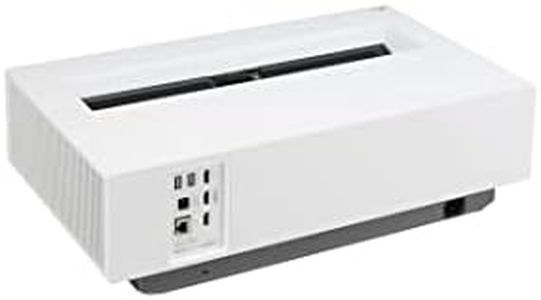
Optoma GT3500HDR 1080p Full HD Home Laser Projector

Rating
7.9
Brightness
Throw Distance
Connectivity

Most important from
308 reviews

Brightness
The picture quality is excellent once color and brightness are adjusted properly. Using an ambient light reflecting screen is crucial for the best experience.
Throw Distance
The projector's ultra-short throw capability allows for a large 100-inch screen from just a foot away, making it ideal for small spaces.
Connectivity
The setup is straightforward and the projector works seamlessly with various devices like Apple TV and gaming consoles.
Portability
The projector is portable and easy to transport, making it convenient for those who need a large screen on the go.

The Optoma GT3500HDR projector offers several impressive features, making it a versatile choice for various uses, including gaming, home entertainment, and business presentations. With its Full HD 1080p resolution and 4K HDR input compatibility, it delivers clear and sharp visuals. The projector's 3800 lumens brightness and 500,000:1 contrast ratio ensure vibrant colors and deep blacks, which are particularly beneficial for watching movies and gaming.

The ultra-short throw capability allows it to project a 100-inch screen from less than a foot away, making it ideal for smaller spaces and reducing shadows that can interfere with the viewing experience. This feature also allows for easy placement in the same spot as a TV, providing a straightforward setup process. The enhanced gaming mode with 8ms input lag at 1080p 120Hz offers a responsive experience, essential for fast-paced games.

The DuraCore laser technology provides a long lamp life of up to 30,000 hours, ensuring durability and consistent brightness over time. Connectivity options are robust, with two HDMI 2.0 ports, USB-A, 3.5mm audio out, RS232, and RJ45, making it compatible with various devices like gaming consoles and streaming devices. The built-in 15W speaker delivers decent sound quality, eliminating the immediate need for external speakers. The projector is also compact and portable, being 28% smaller than previous models, which aids in easy transportation and space-saving setup.

However, while the projector offers great visuals and portability, its Full HD resolution may not be sufficient for those seeking the absolute highest resolution available on the market. Additionally, the built-in speaker, while convenient, may not satisfy audiophiles who prefer high-fidelity sound systems. Despite these minor drawbacks, the Optoma GT3500HDR stands out as a practical and high-performance option for gaming, home entertainment, and professional use.

Rating
7.9
Brightness
Throw Distance
Connectivity

Most important from
308 reviews

Brightness
The picture quality is excellent once color and brightness are adjusted properly. Using an ambient light reflecting screen is crucial for the best experience.
Throw Distance
The projector's ultra-short throw capability allows for a large 100-inch screen from just a foot away, making it ideal for small spaces.
Connectivity
The setup is straightforward and the projector works seamlessly with various devices like Apple TV and gaming consoles.
Portability
The projector is portable and easy to transport, making it convenient for those who need a large screen on the go.

Buying Guide for the Best Projectors

Choosing a projector can seem overwhelming due to the variety of models and technical jargon. The key to finding the right projector is understanding how and where you'll use it: are you planning to watch movies at home, give presentations, or set up outdoor screenings? By matching your needs with the essential specs, you'll pick a projector that delivers the experience you want.
Brightness (Lumens)Brightness, measured in lumens, indicates how much light the projector can output. This is crucial because a brighter projector performs better in rooms with more ambient light, while dimmer rooms allow for lower lumen models. Projectors with lower lumens (under 2000) work best in dark settings, such as home theaters. Mid-range projectors (2000–3500 lumens) are good for rooms with some lighting, like typical living rooms or classrooms. High-brightness projectors (above 3500 lumens) are meant for large, bright spaces or outdoor use. To choose the right brightness, think about your environment: if the room is dark, you can go lower; if there's uncontrolled light, you'll need higher lumens.
ResolutionResolution is the number of pixels the projector can display, affecting the sharpness and clarity of the image. Common resolutions include SVGA (800x600), XGA (1024x768), HD (1280x720), Full HD (1920x1080), and 4K (3840x2160). Lower resolutions are suitable for basic presentations with text and simple graphics. If you're planning to watch movies or play games, higher resolutions like Full HD or 4K will give you a crisper, more vibrant picture. Match the resolution to your content: text-based slideshows are fine with basic resolution, but video and detailed graphics benefit from higher numbers.
Contrast RatioContrast ratio describes how well the projector can differentiate between the darkest blacks and brightest whites on screen. Higher contrast ratios create more vivid and dynamic images, especially noticeable in movie scenes with shadows and highlights. For basic office work, a lower ratio might not be an issue. For home cinema or gaming, higher contrast is better for an immersive experience. When picking, consider if deep blacks and rich colors are important for your viewing pleasure, especially for movies and photos.
PortabilityPortability refers to the size and weight of the projector. Some have a compact, lightweight design for easy carry, while others are larger and intended for permanent installation. If you'll be moving the projector between rooms or taking it to meetings, prioritize smaller, lighter models. For a fixed setup in a home theater or an office, a larger and heavier projector might offer more features. Think about how often you’ll move your projector and pick accordingly.
Connectivity OptionsConnectivity covers the types of inputs and outputs the projector has, such as HDMI, VGA, USB, audio out, and sometimes wireless options like Bluetooth or Wi-Fi. This is important because it determines whether you can easily connect your devices, such as laptops, gaming consoles, or streaming sticks. More connectivity options give you flexibility. If your setup is simple, you may only need HDMI, but for multiple device use or old equipment compatibility, look for a variety of ports.
Lamp LifeLamp life estimates how many hours the projector's light source will last before needing replacement. Longer lamp life means less frequent replacements and lower ongoing maintenance. Typical lamp lives are around 2,000–6,000 hours, but some newer models (using LED or laser light sources) can last much longer. If you plan frequent, long viewing sessions, or don't want the hassle of changing lamps often, opt for a projector with a longer-rated lamp life.
Throw Distance and Image SizeThrow distance is the space between the projector and the screen and affects how large the projected image will be. Shorter throw projectors can create big images from nearby, which is useful in small rooms, while standard (long-throw) projectors need more room to make a large picture. Consider where you'll set up: in compact spaces, a short-throw is helpful; in large rooms, a regular model is fine. Check the projector’s specifications for the right match with your intended setup location.
Speakers and SoundMany projectors come with built-in speakers, but their quality and volume can vary widely. If sound is crucial, especially for movie watching, you might need to connect external speakers. For simple use like presentations, built-in sound might be enough. Think about your sound needs and whether you mind adding an external audio solution.

FAQ